How to get a document to read to you

I once enjoyed (hmm did I, though?) a dalliance with writing a newsletter and unintentionally sent a limited edition email.
I’d spent so long gearing myself up to actually write the 10-email welcome sequence. So long working my way around the software. And oh so long making sure the emails were juuuuust right.
I’d checked the original file and each email many many times. By the time it was ready to go live I was sick of the sodding sight of it all.
So I shared the link. Off it flew. There was a typo in a subject line. Gah!
I removed the issue. I reread the email. And there were a few sentences that could be that bit tighter. Punchier. There always are.
So I made a couple of extra tweaks, set it live and uploaded a few new contacts who’d opted in.
And when one of them replied to that email? I spotted a new error. One I’d introduced when I’d fannied about with the ‘improvements’.
I’d written two words two words twice.
I’d forgotten to do the one thing I REALLY NEED TO DO when I write my own stuff.
Do you do this too…?
You’ve compiled the research (that was, no fib, originally written ‘complied’). Written it. Edited it. Worked through your manager’s suggestions and client’s amends. Edited it again. Eaten four Kinder Happy Hippos for sugar and sanity. Done your best to save the fifth for after you’ve proofed it. You proofread it. Your eyes roll back in your head. The sugar’s not kicked in yet.
There are some things we still need to check ourselves: think UK/US spellings or if it’s practice or practise.
But what about those little slips that aren’t spelling mistakes but they still shouldn’t be there? Like my doubling up.
What we need is someone to read it back to us!
Text tech
Text to speech (TTS) tech reads your digital copy back to you. No more reading it aloud yourself. Especially when you’re really just reading it from memory because you’ve spent days writing and honing and battling competing stakeholder ‘recommendations’ and a catty comment from management on why it’s taking you so long to write it.
You know what it says. You know what it said before it became what it says. And you know what it means. Whether it says what it means or not.
Making your mind up
The TTS you need depends on the document format you’re typing in. And what you want it for. Word and Google Docs have a different way of doing things.
Maybe you want something to read what you’ve written back to you. Or you simply prefer listening rather than reading. Maybe you want something to read webpages to you too. These options tend to be free.
If you want something that’ll read emails and other web apps, you’ll probably need to pay for swish software.
TTS cuts out having to listen to your own intonation and flow. You hear it differently. You can speed it up. And then you can slow it down. You can’t get Cheryl Baker to read it back to you but some software gives you a choice of speakers and accents.
We don’t always have people who can have a squizz over our copy for us. Even if we do, UK English Daniel and US English Serena don’t need fuelling with coffee or have other clients and projects to manage. And they won’t judge you for all those little crispy Happy Hippo bits you’ve got stuck in your keyboard.
Using Word
If you use Word, The Read Aloud option may already be in the Review tab. It’s near the left.

If not, you can add it to the toolbar. Head over to the Customize Quick Access Toolbar symbol that’s so small you’d never know a really helpful button was lurking in the blue ribbon. Select More Commands.
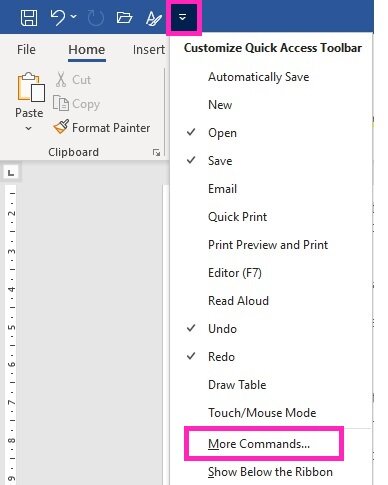
Find the Read Aloud command (or Speak if it’s an older version) and add it to the toolbar. Click OK and you’re done. You can change the speakers in the Text to Speech settings in your Windows Control Panel.

Using Google Docs
I write in Word (we didn’t get computers until middle school and Word has stuck with me) and only use G Docs now and again. In G Docs, I installed the Read & Write Chrome extension because it was the first one I found. That’s how I do tech.
It does what I need. And I can change the speaker too. Although, US English Tom sounds like something built into Terminator’s Skynet system to take down John Connor.
Back chat
Now you’re all set up, let your new chatty pals get to it. Scoff that last Happy Hippo in the box. Shake off those crumbs before you head off to that meeting.
I’ve remembered to run Read Aloud myself this time. And there are no crumbs here. (I’m all about the mint Matchmakers at the moment.)
Reading your work silently or even aloud compared to hearing it read aloud by something else are very different experiences. If you’re reviewing your own content, text-to-speech can be one of the simplest ways to catch issues you can’t see anymore.












Learn how to punctuate bullet points consistently, including when to use capitals, full stops, semicolons and sentence-style formatting.